
Introduction
Your charity profile is one of the first things donors see when they discover your organization on Charity Bridge Fund. A completed profile helps you appear on the platform, but a well-written one does much more. It helps donors understand your mission quickly, builds confidence in your work, and makes your organization easier to recognize and remember.
This article brings together practical writing guidance, optimization tips, and ready-to-use templates to help you create a profile that feels clear, credible, and compelling.
Why your charity profile matters
Donors often decide in seconds whether they want to keep reading. Your profile needs to communicate who you serve, what you do, and why your work matters without making people work to figure it out. The strongest profiles feel specific and human. They give enough detail to build trust, but stay simple enough to scan quickly.
What a strong profile should communicate
Your profile should make it easy for a first-time visitor to understand your purpose.
Concrete details such as years active, number served, or named programs help build trust.
Your content should reflect the real work your organization is doing now.
Writing your Mission and Overview
Your charity profile includes a single Mission and Overview field, so this section needs to do two jobs at once. It should explain why your organization exists and give a brief picture of the work you do. A strong response usually starts with purpose, then moves into programs, services, or community impact. The goal is to sound clear and grounded, not overly formal or abstract.
Best practices for a stronger Mission and Overview
Start with who you serve and what need you address
Follow with what your organization does
Use plain, donor-friendly language
Mention real programs or services when possible
Add numbers if they help tell the story clearly
Avoid jargon, broad claims, or generic phrases
Aim to stay within the green range of the character bar for better display
A simple structure you can follow
Explain why your organization exists and who benefits from your work.
Summarize the support, programs, or services you provide.
Include a detail such as your founding year, service area, population served, or approach.
Remove repetition and make sure the final version sounds natural when read aloud.
Mission and Overview template
“We help [who you serve] by [what you do] so that [intended outcome]. Founded in [year], [organization name] provides [programs or services] for [community or population], with a focus on [approach, values, or area of impact].”
Mission and Overview example
“We help low-income students access academic support and mentorship so they can succeed in school and beyond. Founded in 2015, Bright Scholars provides after-school tutoring, homework support, and leadership programming for underserved youth across our community, with a focus on confidence, consistency, and long-term opportunity.”
Content templates by nonprofit type
Open the version that best matches your work.
Direct service organization
“We support [population] through [services or programs] so they can [outcome]. Our organization provides [key offerings] designed to meet immediate needs while helping people build greater stability and opportunity.”
Education-focused nonprofit
“We expand access to [education or learning opportunity] for [audience] so they can [outcome]. Through [programs or model], we help participants build skills, confidence, and long-term pathways to success.”
Arts and culture organization
“We connect communities to [art form or cultural experience] so that [impact]. Through [performances, classes, exhibitions, or outreach], we create meaningful access to creativity, expression, and cultural enrichment.”
Advocacy or policy organization
“We work to advance [cause or issue] for [population or community] so that [outcome]. Our organization combines [advocacy, education, organizing, research, or coalition-building] to support lasting change.”
Community development organization
“We strengthen [community or place] by [what you do] so residents can [outcome]. Through [programs, partnerships, and services], we invest in long-term wellbeing, local opportunity, and resilience.”
How to make your writing more compelling
The best profiles do not try to sound impressive. They try to sound real. Donors respond better to writing that feels specific and grounded than to broad language that could apply to almost any nonprofit. Phrases like “empowering communities” or “making a difference” become much stronger when you connect them to actual services, outcomes, or populations.
Add credibility with specifics
Before
“We are committed to helping families thrive.”
After
“We provide emergency food support, case management, and family resource referrals for more than 600 households each year.”
Before
“We support students in our community.”
After
“We offer free tutoring, literacy support, and mentorship for 100 students in underserved neighborhoods.”
Preparing Your Charity Logo for Upload
Your charity profile uses a square logo image to help your organization display consistently across Charity Bridge Fund.
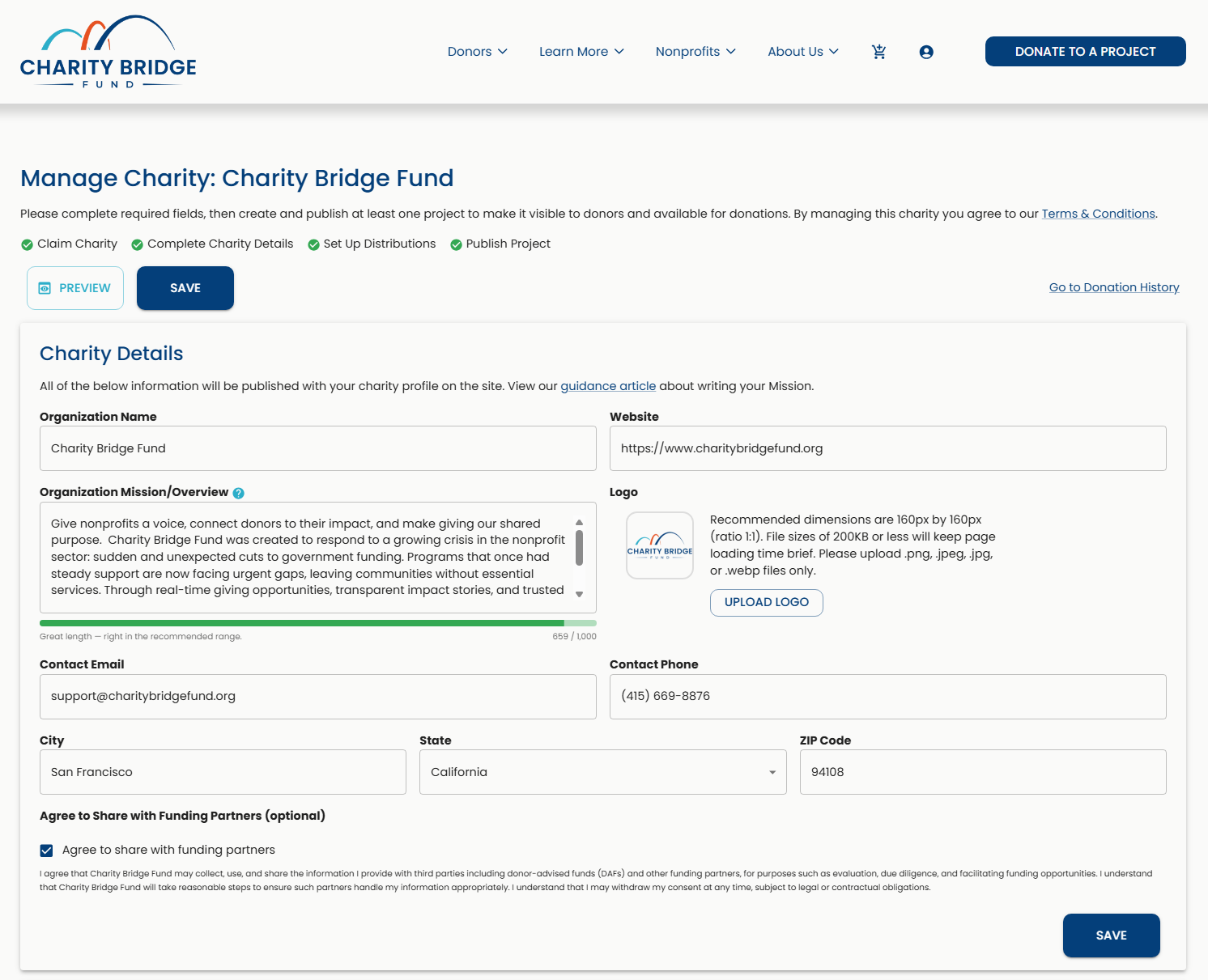
For best results, prepare your logo using the specifications shown in the Charity Details panel:
Recommended dimensions: 160 × 160 px
Aspect ratio: 1:1
File size: 200 KB or less
Supported formats: PNG, JPEG, JPG, or WebP
If your logo is not already square, you do not need to redesign it. You can use an AI image tool to place your existing logo on a 1:1 canvas while keeping the original logo intact.
Using AI to Prepare a Square Logo
Upload your existing logo to an AI image tool and use the prompt below to create an upload-ready square version:
“Place this logo in the center of a square 1:1 canvas. Preserve the original logo exactly without stretching, distorting, cropping, or modifying its design. Leave enough space around the logo so it displays clearly. If a background is needed, use white unless otherwise specified. Prepare the final image for a 160 × 160 px website display.”
Final Profile Check
Before moving on to your project, review your charity profile as a donor would:
Read your Mission and Overview out loud and remove vague or repetitive wording.
Check for clarity: Make sure donors can quickly understand who you serve and what you do.
Review the character bar and adjust the length as needed, prioritizing clear, useful content.
Check your logo to make sure it is clear, recognizable, and displays properly.
Test your Website link to confirm it opens the correct page.
Review your public contact information and confirm your email and phone number are current.
Verify your location information, including City, State, and ZIP Code.
Use Preview to review how your charity profile appears to donors.
Save your latest changes before moving on to your project.
Next Step: Create Your Project
Your charity profile is ready. Your next step is to create a project donors can support.
Scroll down to the Projects panel and select Add Project to create your first project.
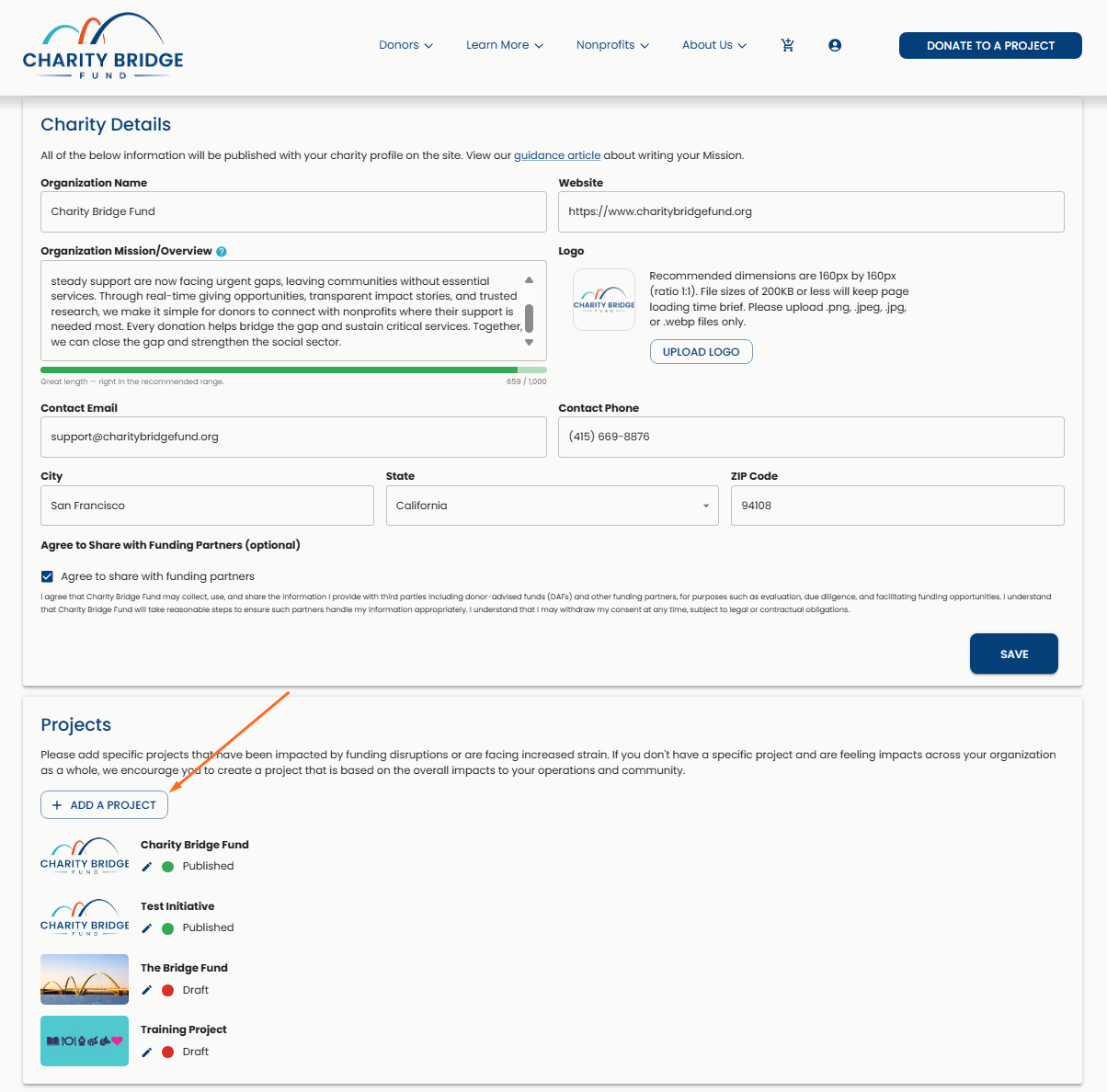
Follow the Adding a Project guide below for step-by-step instructions on completing your project and preparing it for publishing:
FAQ
What should I include in my Mission and Overview?
Explain who your organization serves, what you do, and why your work matters. Specific programs, services, populations, or meaningful details can help donors quickly understand your organization.
How long should the Mission and Overview be?
Use the character bar as a guide and aim for the recommended range of 500–700 characters when possible. Focus first on clarity and usefulness rather than reaching an exact length.
Can I go over the recommended character range?
Yes. The recommended range is a guide, not a requirement. Longer content is allowed, but concise content is generally easier for donors to scan and understand.
What type of image works best for my charity profile?
Use a clear, recognizable version of your organization’s logo. A square 1:1 image is recommended so it displays consistently across Charity Bridge Fund.
How can I make my charity profile stronger?
Use clear, specific language, include meaningful details about your work, keep your contact and website information current, and upload a clean, recognizable logo.
What should I do after completing my charity profile?
Create a project. Projects allow you to present a specific funding need or initiative that donors can discover and support.
A strong charity profile helps donors quickly understand who you are, what you do, and why your work matters. Once your profile is clear, current, and complete, move on to creating a project that gives donors a specific opportunity to support your work.