
Introduction
Once your charity profile is complete, your project profile is where you can share a specific funding need and the impact it has on the people and communities you serve.
A strong project profile helps donors understand what’s at stake, why support is needed, and the difference their support can make. This guide provides practical writing tips, templates, and examples to help you tell that story clearly and build a project profile that connects with donors.
Building a Project Profile That Connects With Donors
Your project profile is where a specific funding need comes into focus. It should help donors quickly understand what needs support, who is affected, and what their contribution can help make possible.
Focus your project profile around three things:
The Need
Clearly explain the program or service facing a funding gap and what support is needed.
The Impact
Show who is affected and what the funding gap means for the people and communities you serve.
The Opportunity to Help
Help donors understand what their support can make possible.
Keep these three elements in mind as you build your project profile. The sections below will walk you through each panel of the Project Editor and show you how to make your content clear, focused, and useful to donors.
Project Details
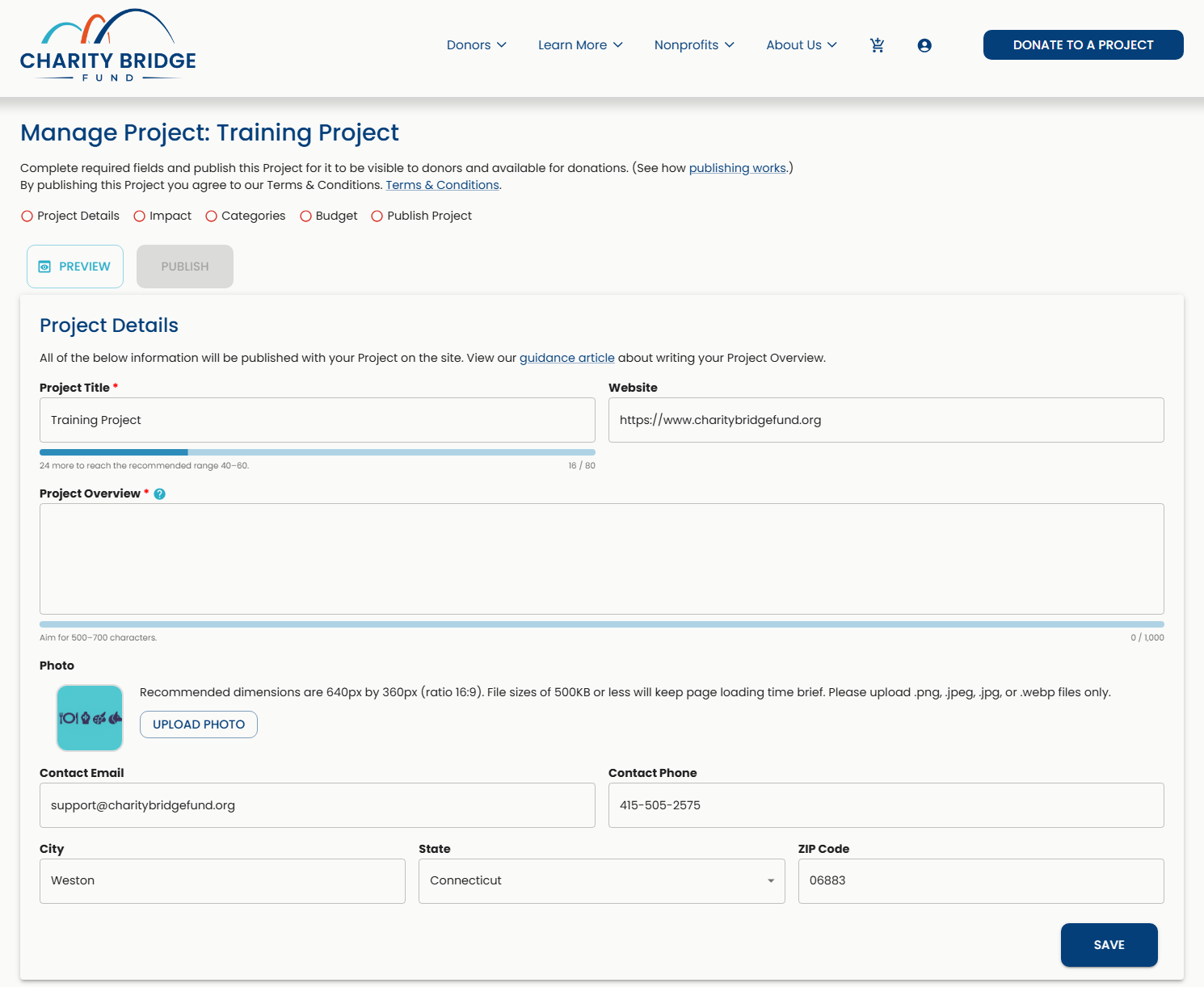
Project Details is where you introduce your project to donors and give them the essential information they need to understand what you are asking them to support.
Use this panel to make the project easy to recognize, understand, and explore before donors move into the details of its impact.
Choosing a Strong Project Title
Your project title should quickly tell donors what the project is about. Keep it clear, specific, and connected to the program, service, or initiative that needs support.
Avoid titles that are so broad that donors need to read the full project description to understand what the project does.
Writing a Project Overview that works
Your Project Overview is your opportunity to tell donors what the project does and why their support matters.
Keep the focus on the specific project rather than describing your organization as a whole. Explain the program, service, or initiative, who it serves, the need it addresses, and what continued support can help make possible.
A Simple Structure for Your Project Overview
Start with a clear description of the program, service, or initiative.
Identify the people or communities that benefit from the work.
Explain what is at risk and how the funding need affects the project.
Help donors understand what their contribution can help continue, protect, restore, or sustain.
Project Overview Template
[Project Name] provides [program or service] for [population or community] in [location, if relevant]. Due to [funding need or disruption], [specific part of the work] is at risk. Support for this project will help [what continued funding makes possible].
Project Overview Example
After-School Tutoring for Underserved Students provides free academic support for students who need additional help in math and reading. Due to a funding gap, the program is at risk of reducing tutoring hours and the number of students it can serve. Support for this project will help keep tutoring available and give students continued access to the academic support they need.
Choosing Your Project Photo
Your project photo should reinforce the story you are telling. Choose an image that helps donors quickly connect the project to the people, community, or work their support will help sustain.
Whenever possible, use an authentic photo from the project rather than a generic stock image, logo, or graphic with heavy text.
Avoid Logos
Logos do not show donors the people, work, or community behind your project.
Use Authentic Photos
Choose a real project photo that helps donors connect with the people, work, or community their support can help sustain.
What Works Best
Use a clear, high-quality photo related directly to the project.
Show the people, program, service, or setting whenever appropriate.
Choose an image that still makes sense without additional explanation.
Avoid heavy text overlays or overly designed graphics.
Make sure you have permission to use the image, especially when identifiable people are shown.
Project Photo Requirements
Recommended size: 640 × 360 px
Aspect ratio: 16:9
File size: 500 KB or less
Formats: PNG, JPEG, JPG, or WebP
Using AI to Prepare Your Project Photo
If you have a photo that does not fit the recommended dimensions, an AI image tool can help you prepare it for your project without changing the original subject or creating a completely different image.
Upload your photo and use a prompt like:
Prepare this image for a 640 × 360 px, 16:9 website display. Preserve the original subjects and important details without stretching or distorting them. Adjust the composition or extend the surrounding background naturally if needed to fit the horizontal format. Do not add text, logos, or new people. Keep the final image realistic and true to the original photo.
Need help preparing your project image?
Use our AI image guide for ready-to-use prompts that can help you resize, reformat, or adapt your image for Charity Bridge Fund.
Website, Contact Information, and Location
Complete your Project Details with information that helps donors learn more about the project, understand where the work is taking place, and reach your organization if needed.
Link to the most relevant page where donors can learn more about the project or your organization.
Use current contact information that is actively monitored and appropriate for project-related questions.
Use the location where the project or your organization is primarily based. If the project operates across a broader area or internationally, use your organization’s primary location.
Impact
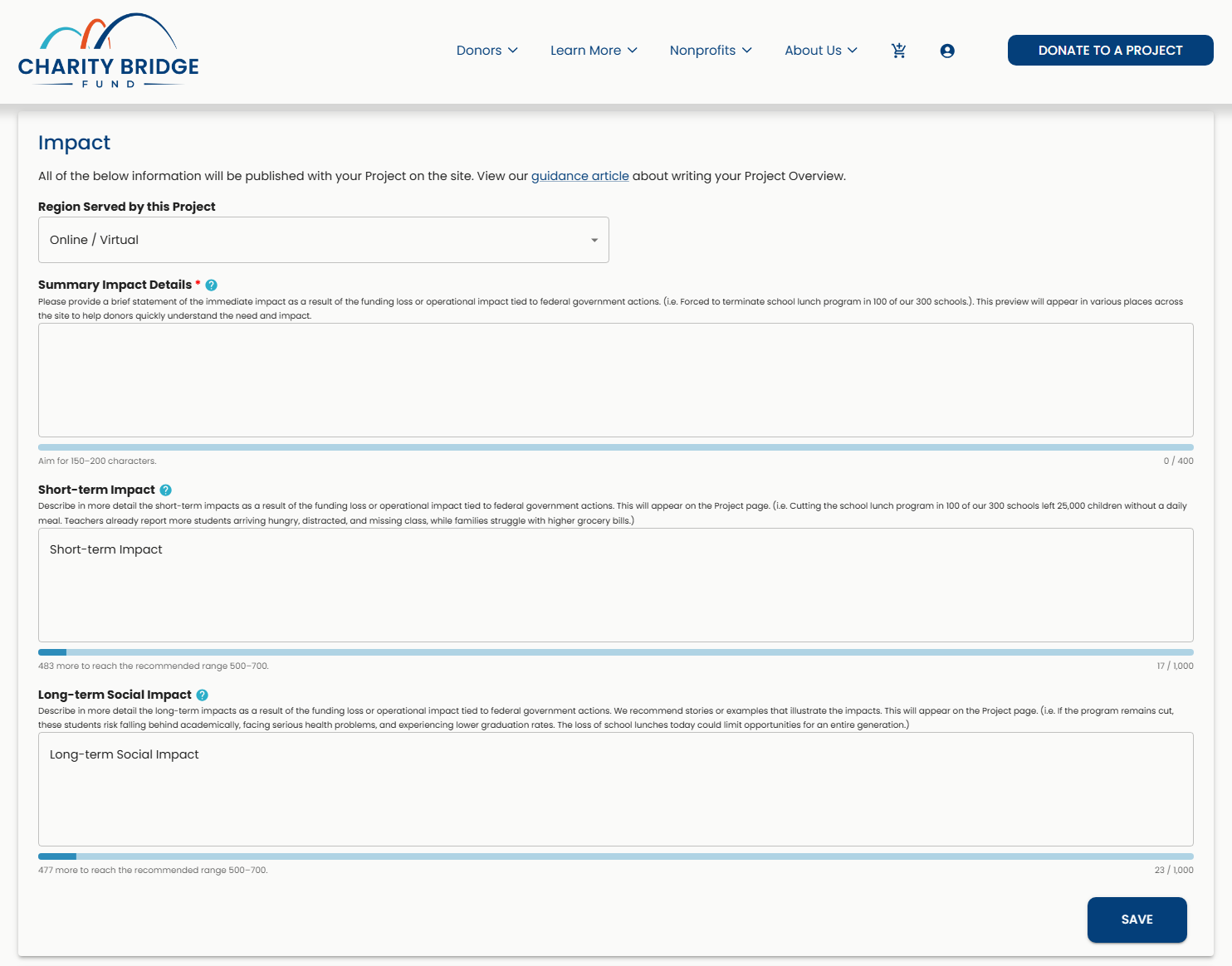
The Impact panel is where you show donors what the funding need means for the people and communities your project serves. Use these fields to explain where the work takes place, what is at risk today, and why sustaining the project matters over time.
Each impact field has a different purpose. Together, they should build the story without repeating the same information.
Region Served by This Project
Select the option that best represents the geographic reach of your project and the communities it serves.
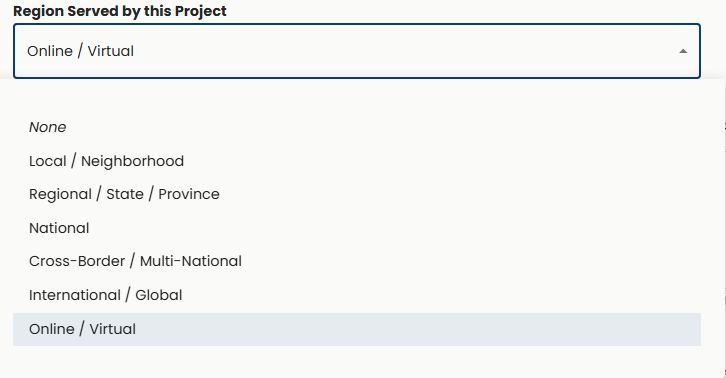
Choose based on the project itself rather than the overall reach of your organization. For example, a national organization may have a project focused on a single local community, while another project may serve people across multiple countries.
Summary Impact Details
Your Summary Impact gives donors a quick understanding of what is at stake. Keep it brief, specific, and focused on the most immediate effect of the funding need.
This field may appear in smaller areas across Charity Bridge Fund, so it should make sense on its own without requiring the full Project Overview.
Summary Impact Template
Due to [funding need or disruption], [program, service, or activity] is at risk of [reduction, delay, pause, or interruption], affecting [people or community served].
Summary Impact Example
Due to a funding gap, our after-school tutoring program is at risk of reducing tutoring hours and serving fewer students who need additional support in math and reading.
Aim for 150–200 characters, with a maximum of 400 characters.
Short-term Impact
Your Short-Term Impact explains what the funding need means right now. Use this space to show donors the immediate effects on the people, programs, or services your project supports.
Focus on specific consequences, such as reduced services, fewer people served, limited hours, staffing changes, delayed programs, or resources that may no longer be available.
Short-Term Impact Template | InstantDocs: Quote
Without sufficient funding, [program or service] may need to [immediate change]. This would affect [people or community served] by [direct consequence], while also [secondary effect, if relevant].
Short-Term Impact Example
Without sufficient funding, the after-school tutoring program may need to reduce weekly tutoring hours and limit the number of students it can serve. Students who rely on the program for additional help in math and reading would have fewer opportunities for individualized academic support during the school year.
Aim for 500–700 characters, with a maximum of 1,000 characters.
Long-term Social Impact
Your Long-Term Social Impact looks beyond the immediate funding need and helps donors understand why sustaining this work matters over time.
Consider what continued loss or reduction of the project could mean for the people you serve and the broader community. Keep the connection realistic and directly related to the work your project does.
Long-Term Social Impact Template
If [program or service] cannot continue at its current level, [people or community served] may face [long-term consequence]. Over time, this could contribute to [broader effect] and make it more difficult to [desired outcome].
Long-Term Social Impact Example
If access to after-school tutoring continues to decline, students who need additional academic support may have greater difficulty keeping pace with their coursework. Over time, persistent learning gaps can make it harder for students to build the skills and confidence they need to succeed in school.
Aim for 500–700 characters, with a maximum of 1,000 characters.
Bringing Your Impact Story Together
Your impact fields should build on one another rather than repeat the same message.
Summary Impact
Gives donors the quick takeaway.
Short-Term Impact
Explains what the funding need means now.
Long-Term Social Impact
Shows why sustaining the work matters over time.
Read the three fields together before saving. Each one should add something new to the story and help donors better understand what is at stake.
Categories
Categories help determine where your project appears when donors browse different areas of interest on Charity Bridge Fund. Because a project can address more than one type of need, you can select up to four Category and Subcategory combinations when they meaningfully represent the work.
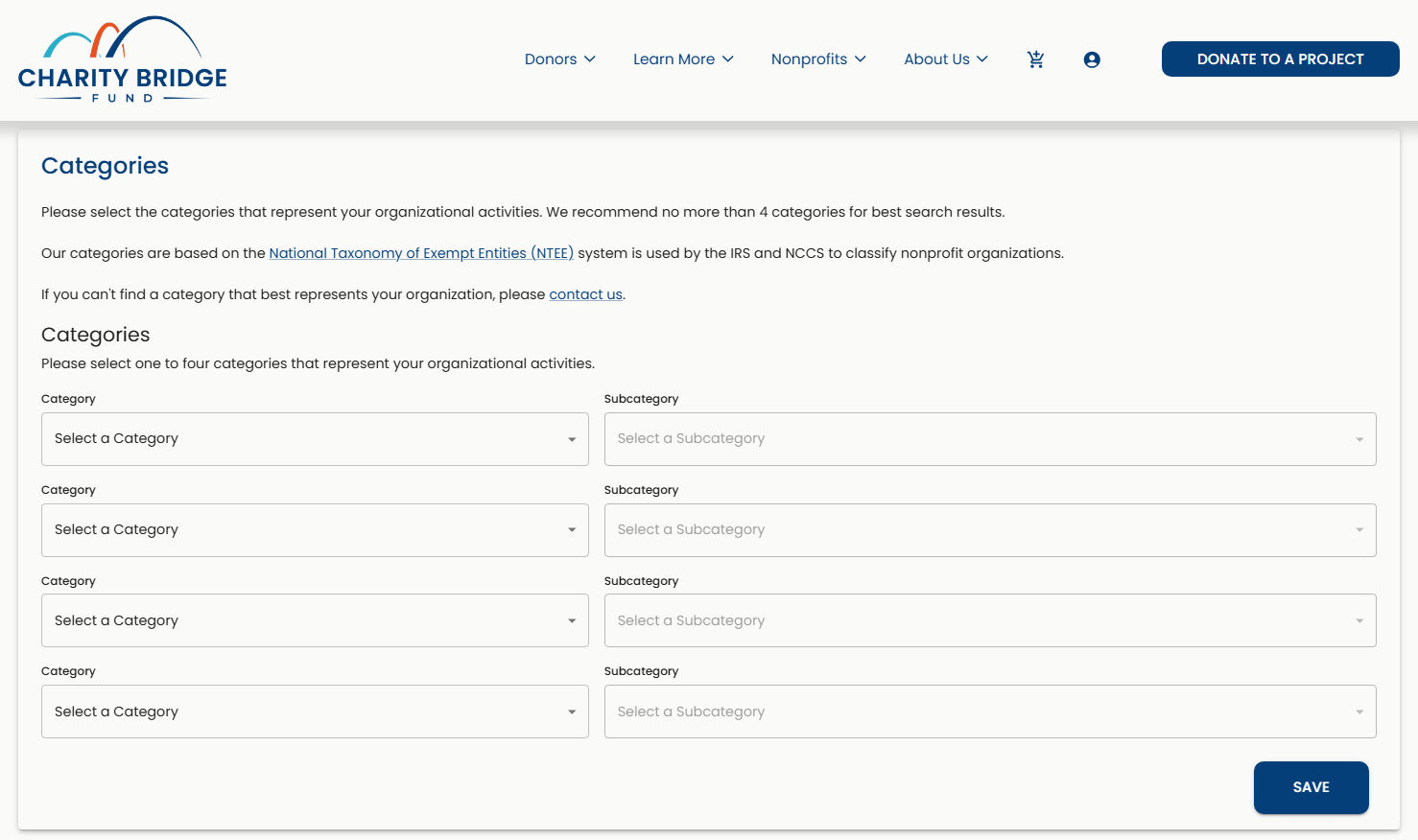
The category list is intentionally broad and simplified. You may not always find a category that describes your work exactly. If you do not see an exact match, choose the Category and Subcategory that most closely represent the project.
Choose categories based on the specific project, rather than everything your organization does. Adding categories that do not meaningfully fit the project can dilute its relevance and cause it to appear in areas where donors would not expect to find it.
When Multiple Categories Make Sense
Our After-School Tutoring and Mentorship Program is a good example of a project that naturally fits in more than one place:
Education → Educational Services
The tutoring component provides students with direct academic support outside of the traditional classroom.
Youth Development → Youth Development Programs
The mentorship component supports students beyond academics through personal development, guidance, and encouragement.
Together, these selections represent two meaningful parts of the same project. Multiple categories can help donors discover your project through different areas of interest, but each selection should have a clear connection to the work you are asking them to support.
Need help choosing the right categories?
Learn how Charity Bridge Fund’s project categories are organized, how Categories and Subcategories connect your project to Causes, and what to do when you don’t see an exact match for your work:
Budget
Your project budget helps donors understand the scale of the project and how much support is needed to help sustain the work.
Total Budget represents the overall cost of the project, while Funding Need shows the amount you are seeking to support through the project.
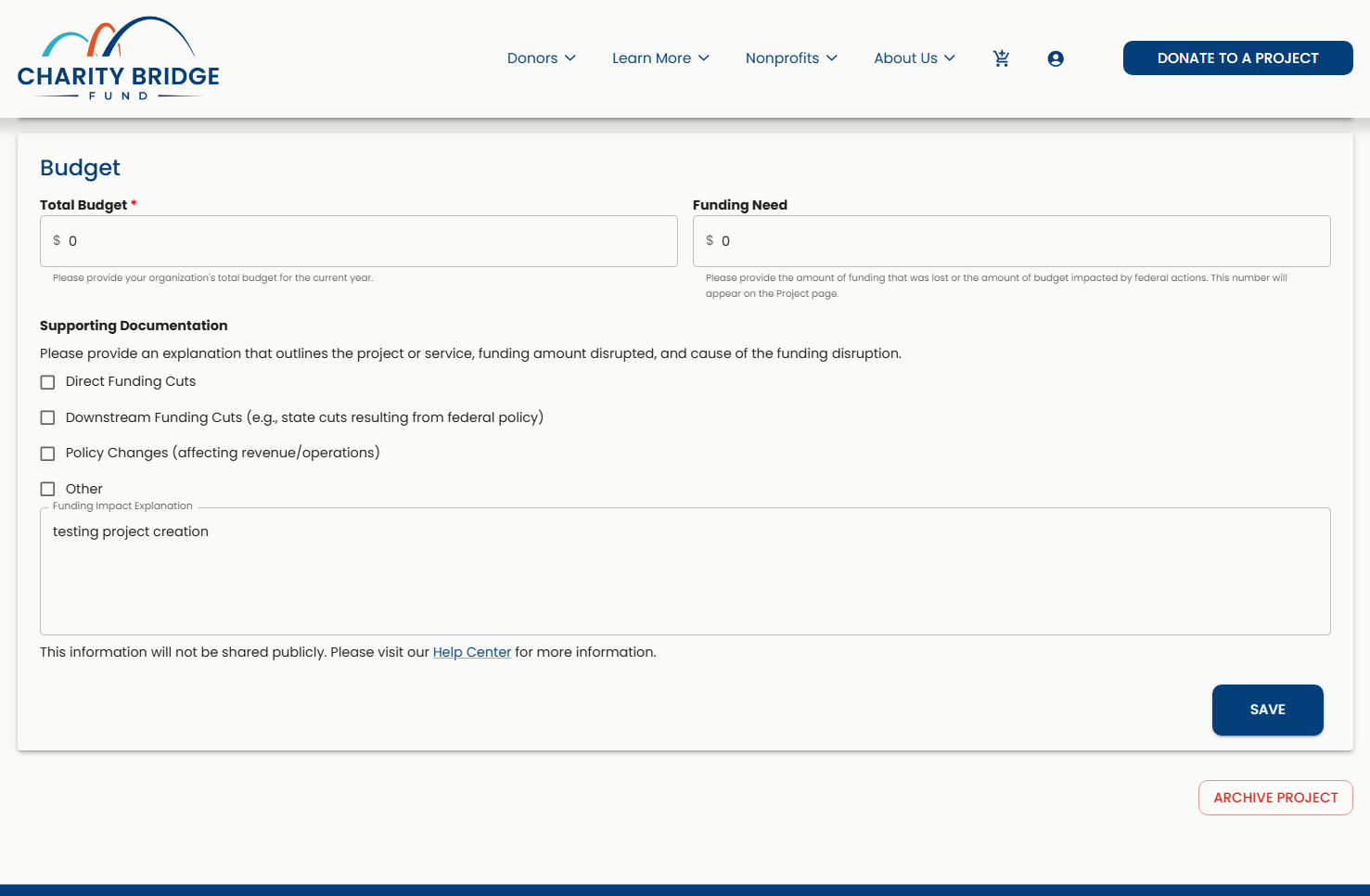
Make sure these amounts are accurate and consistent with the story you’ve told throughout your Project Overview and Impact sections. If your project spans multiple years, enter the budget and funding need for the full project period rather than only a single year.
Keep Your Funding Story Consistent
Using our After-School Tutoring and Mentorship Program as an example:
Total Budget: $150,000
The full cost of operating the tutoring and mentorship program.
Funding Need: $45,000
The amount needed to address the current funding gap and help maintain tutoring hours and mentorship services.
The Funding Need should make sense in the context of the project. If your Overview and Impact sections describe a specific service or program at risk, the amount you enter should reflect the funding needed to support that work.
Final Project Check
Use the progress indicators at the top of the Project Editor as a quick check before publishing.
A red outlined circle means a section is incomplete, while a green circle with a check means it is complete.

Before publishing, review your project as a donor would:
Project Title: Make sure it is clear, specific, and easy to understand.
Project Overview: Confirm it explains what the project does, who it serves, and why it matters.
Photo: Check that the image is clear, relevant, properly sized, and displays well.
Impact: Review all the fields for clarity and consistency.
Region Served: Confirm the selected option accurately reflects the project’s reach.
Categories: Make sure each Category and Subcategory selection genuinely fits the project.
Budget: Confirm Total Budget and Funding Need are accurate and reflect the full project period.
Contact Information: Verify the public email and phone number are current.
Location: Confirm the location information is accurate.
Character Bars: Use the recommended ranges as a guide while prioritizing clear, useful content.
Preview: Review the project from a donor’s perspective.
Save: Save your latest changes before publishing.
Publish Your Project
Once your project is complete, reviewed, and saved, select Publish Project at the top of the Project Editor.
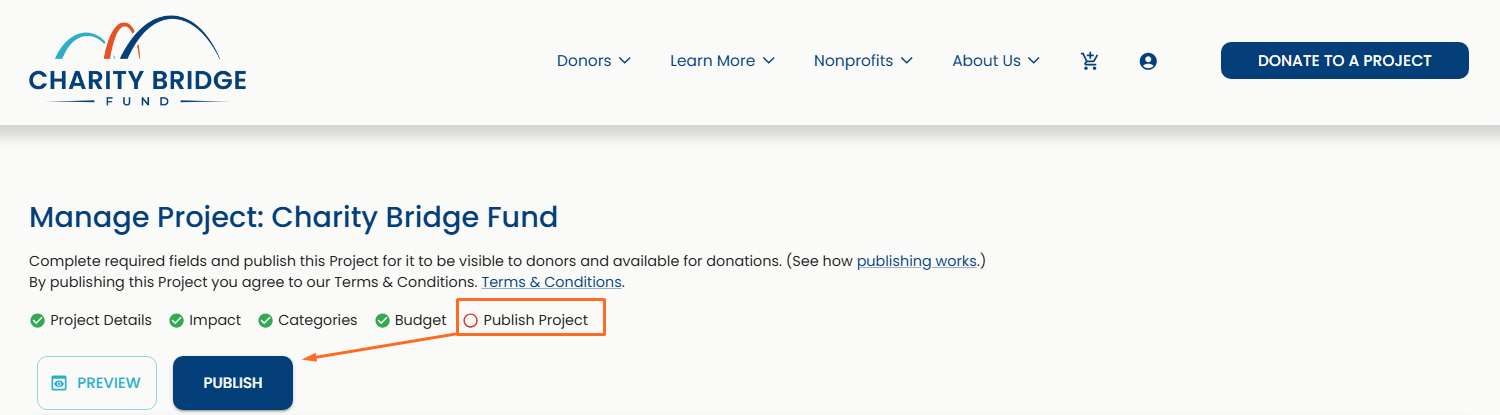
Publishing makes your project visible to donors and available to receive donations.
For more information about publishing, unpublishing, and project status, see:
FAQ
How can I make my project profile more effective for donors?
Focus on three things: the need, the impact, and the opportunity to help. Keep the project specific, use clear language, and make sure each section adds useful information rather than repeating the same message.
What should I include in my Project Overview?
Explain what the project does, who it serves, the need it addresses, and what continued support can help make possible. Keep the focus on the specific project rather than your organization as a whole.
How are Summary Impact, Short-Term Impact, and Long-Term Social Impact different?
Summary Impact gives donors a quick takeaway. Short-Term Impact explains what the funding need means now, while Long-Term Social Impact shows why sustaining the work matters over time. Each field should add something new to the project story.
Can I select more than one category for my project?
Yes. You can select up to four Category and Subcategory combinations when they meaningfully represent the project. Avoid adding categories that do not fit simply to increase visibility.
What if I don’t see an exact category for my project?
Choose the Category and Subcategory that most closely represent the work. Charity Bridge Fund uses a simplified category structure, so highly specific types of work may fall under a broader option.
What budget should I enter for a multi-year project?
Use the Total Budget and Funding Need for the full project period. If your project and its budget span three years, for example, enter the amounts that represent that full three-year period rather than only one year.
How do I know when my project is ready to publish?
Check the progress indicators for incomplete sections, then review your content, image, impact information, categories, budget, contact information, and location. Use Preview to see the project from a donor’s perspective and save your latest changes before publishing.
A strong project profile helps donors see the connection between a funding need and the people, programs, and communities it affects. Keep your project clear, specific, and current so donors can understand what’s at stake and what their support can help make possible.