
Introduction
Charity Bridge Fund helps donors discover and support nonprofits in their communities, including organizations connected to food assistance, housing and shelter, public media, national parks, and other causes.
Some organizations may appear in Charity Bridge Fund Local search results based on publicly available nonprofit information. If you are an authorized representative and do not want your organization to appear on the platform, you can opt out by first claiming the charity and then archiving it.
Before You Opt Out
To manage your organization’s visibility, you must first claim the charity. Claiming verifies that you are authorized to represent the organization and gives you access to its Charity Management page. You will need your organization’s:
EIN
IRS 501(c)(3) Determination Letter
Now that you are an authorized representative, you do not have to archive your charity. You can also continue setting up your organization, creating and publishing projects, and using Charity Bridge Fund to connect with donors.
How to Opt Out
Go to My Account and sign in.
Use your organization’s EIN and IRS Determination Letter to complete the claim process.
Once approved, you will become an authorized representative and gain access to manage the charity.
From Your Charities, select the organization you want to manage.
Locate the Archive Charity option at the bottom of the Charity Management page and confirm that you want to archive the organization.
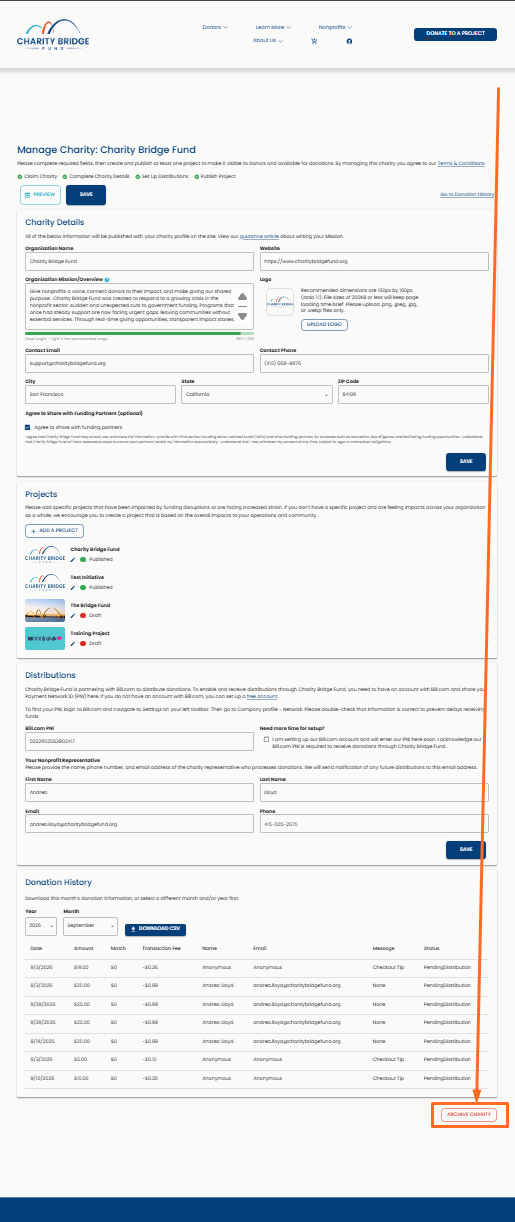
Once archived, the charity will no longer appear in Charity Bridge Fund Local search results or other public listings on the platform.
If You Need Help
If you believe your organization is listed incorrectly, or if you need help claiming your charity, contact Charity Bridge Fund support for assistance at
nonprofits@charitybridgefund.org
FAQ
Why is my organization appearing in Local search results?
Charity Bridge Fund Local may display nonprofits using publicly available organization information.
Why do I need to claim my charity before opting out?
Claiming confirms that you are authorized to manage the organization and its visibility on Charity Bridge Fund.
What happens when I archive my charity?
Your organization will no longer appear in Charity Bridge Fund Local search results or other public listings on the platform.
Do I have to archive my charity after claiming it?
No. Once you become an authorized representative, you can also continue setting up your organization, create projects, and use Charity Bridge Fund instead.
Can I use Charity Bridge Fund instead of opting out?
Yes. Once you claim your charity, you can choose to keep using the platform to manage your profile, create projects, and connect with donors. This will allow your organization to appear in other sections on the Charity Bridge Fund site.
Claiming your charity gives authorized representatives control over how the organization appears on Charity Bridge Fund. If you choose not to participate, archiving the charity removes it from public listings while keeping the process simple and direct.